Saturday, December 15, 2018

AngularJS Part 1

What is AngularJS?

AngularJS is an open source Model-View-Controller framework which is similar to theJavaScript framework.
Angular JS is probably one of the most popular modern day web frameworks available today. This framework is used for developing mostly Single Page applications. This framework has been developed by a group of developers from Google itself.
Because of the sheer support of Google and ideas from a wide community forum, the framework is always kept up to date. Also, it always incorporates the latest development trends in the market.

AngularJS Features

Angular has the following key features which makes it one of the powerful frameworks in the market.
  1. MVC – The framework is built on the famous concept of MVC (Model-View-Controller). This is a design pattern used in all modern day web applications. This pattern is based on splitting the business logic layer, the data layer, and presentation layer into separate sections. The division into different sections is done so that each one could be managed more easily.
  2. Data Model Binding – You don't need to write special code to bind data to the HTML controls. This can be done by Angular by just adding a few snippets of code.
  3. Writing less code – When carrying out DOM manipulation a lot of JavaScript was required to be written to design any application. But with Angular, you will be amazed with the lesser amount of code you need to write for DOM manipulation.
4.    Unit Testing ready – The designers at Google not only developed Angular but also developed a testing framework called "Karma" which helps in designing unit tests for AngularJS applications.


AngularJS Architecture

Angular.js follows the MVC architecture, the diagram of the MVC framework as shown below.
AngularJS: Introduction, Architecture, Advantages
Angularjs Architecture Diagram
  • The Controller represents the layer that has the business logic. User events trigger the functions which are stored inside your controller. The user events are part of the controller.
  • Views are used to represent the presentation layer which is provided to the end users
  • Models are used to represent your data. The data in your model can be as simple as just having primitive declarations. For example, if you are maintaining a student application, your data model could just have a student id and a name. Or it can also be complex by having a structured data model. If you are maintaining a car ownership application, you can have structures to define the vehicle itself in terms of its engine capacity, seating capacity, etc.

AngularJS Advantages

  • Since it's an open source framework, you can expect the number of errors or issues to be minimal.
    • Two-way binding – Angular.js keeps the data and presentation layer in sync. Now you don't need to write additional JavaScript code to keep the data in your HTML code and your data later in sync. Angular.js will automatically do this for you. You just need to specify which control is bound to which part of your model.
    AngularJS: Introduction, Architecture, Advantages
    • Routing – Angular can take care of routing which means moving from one view to another. This is the key fundamental of single page applications; wherein you can move to different functionalities in your web application based on user interaction but still stay on the same page.
    • Angular supports testing, both Unit Testing, and Integration Testing.
    • It extends HTML by providing its own elements called directives. At a high level, directives are markers on a DOM element (such as an attribute, element name, and comment or CSS class) that tell AngularJS's HTML compiler to attach a specified behavior to that DOM element. These directives help in extending the functionality of existing HTML elements to give more power to your web application.

R Vs Python: What’s the difference?

R and Python are both open-source programming languages with a large community. New libraries or tools are added continuously to their respective catalog. R is mainly used for statistical analysis while Python provides a more general approach to data science.
R and Python are state of the art in terms of programming language oriented towards data science. Learning both of them is, of course, the ideal solution. R and Python requires a time-investment, and such luxury is not available for everyone. Python is a general-purpose language with a readable syntax. R, however, is built by statisticians and encompasses their specific language.

R

Academics and statisticians have developed R over two decades. R has now one of the richest ecosystems to perform data analysis. There are around 12000 packages available in CRAN (open-source repository). It is possible to find a library for whatever the analysis you want to perform. The rich variety of library makes R the first choice for statistical analysis, especially for specialized analytical work.
The cutting-edge difference between R and the other statistical products is the output. R has fantastic tools to communicate the results. Rstudio comes with the library knitr. Xie Yihui wrote this package. He made reporting trivial and elegant. Communicating the findings with a presentation or a document is easy.

Python

Python can pretty much do the same tasks as R: data wrangling, engineering, feature selection web scrapping, app and so on. Python is a tool to deploy and implement machine learning at a large-scale. Python codes are easier to maintain and more robust than R. Years ago; Python didn't have many data analysis and machine learning libraries. Recently, Python is catching up and provides cutting-edge API for machine learning or Artificial Intelligence. Most of the data science job can be done with five Python libraries: Numpy, Pandas, Scipy, Scikit-learn and Seaborn.
Python, on the other hand, makes replicability and accessibility easier than R. In fact, if you need to use the results of your analysis in an application or website, Python is the best choice.

Difference between R and Python

ParameterRPython
ObjectiveData analysis and statisticsDeployment and production
Primary UsersScholar and R&DProgrammers and developers
FlexibilityEasy to use available libraryEasy to construct new models from scratch. I.e., matrix computation and optimization
Learning curveDifficult at the beginningLinear and smooth
Popularity of Programming Language. Percentage change4.23% in 201821.69% in 2018
Average Salary$99.000$100.000
IntegrationRun locallyWell-integrated with app
TaskEasy to get primary resultsGood to deploy algorithm
Database sizeHandle huge sizeHandle huge size
IDERstudioSpyder, Ipthon Notebook
Important Packages and librarytydiverse, ggplot2, caret, zoopandas, scipy, scikit-learn, TensorFlow, caret
DisadvantagesSlow High Learning curve Dependencies between libraryNot as many libraries as R
Advantages
  • Graphs are made to talk. R makes it beautiful
  • Large catalog for data analysis
  • GitHub interface
  • RMarkdown
  • Shiny
  • Jupyter notebook: Notebooks help to share data with colleagues
  • Mathematical computation
  • Deployment
  • Code Readability
  • Speed
  • Function in Python

Wednesday, December 12, 2018

Java try block is used to enclose the code that might throw an exception. It must be used within the method.
Java try block must be followed by either catch or finally block.

Syntax of Java try-catch

  1. try{  
  2. //code that may throw exception  
  3. }catch(Exception_class_Name ref){}  

Syntax of try-finally block

  1. try{  
  2. //code that may throw exception  
  3. }finally{}  

Java catch block

Java catch block is used to handle the Exception. It must be used after the try block only.
You can use multiple catch block with a single try.

If you have to perform different tasks at the occurrence of different Exceptions, use java multi catch block.

Rule: At a time only one Exception is occured and at a time only one catch block is executed.

Rule: All catch blocks must be ordered from most specific to most general i.e. catch for ArithmeticException must come before catch for Exception .

The try block within a try block is known as nested try block in java.

Why use nested try block

Sometimes a situation may arise where a part of a block may cause one error and the entire block itself may cause another error. In such cases, exception handlers have to be nested.


Java finally block

Java finally block is a block that is used to execute important code such as closing connection, stream etc.
Java finally block is always executed whether exception is handled or not.
Java finally block follows try or catch block.


Why use java finally

  • Finally block in java can be used to put "cleanup" code such as closing a file, closing connection etc.


Rule: For each try block there can be zero or more catch blocks, but only one finally block.

Note: The finally block will not be executed if program exits(either by calling System.exit() or by causing a fatal error that causes the process to abort).

Saturday, December 8, 2018

static keyword


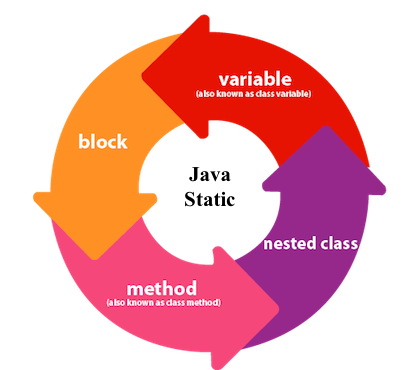
The static keyword in Java is used for memory management mainly. We can apply java static keyword with variables, methods, blocks and nested class. The static keyword belongs to the class than an instance of the class.
The static can be:
  1. Variable (also known as a class variable)
  2. Method (also known as a class method)
  3. Block
  4. Nested class
1) Java static variable
If you declare any variable as static, it is known as a static variable.
  • The static variable can be used to refer to the common property of all objects (which is not unique for each object), for example, the company name of employees, college name of students, etc.
  • The static variable gets memory only once in the class area at the time of class loading.
Advantages of static variable
It makes your program memory efficient (i.e., it saves memory).
2) Java static method
If you apply static keyword with any method, it is known as static method.
  • A static method belongs to the class rather than the object of a class.
  • A static method can be invoked without the need for creating an instance of a class.
  • A static method can access static data member and can change the value of it.
Restrictions for the static method
There are two main restrictions for the static method. They are:
  1. The static method can not use non static data member or call non-static method directly.
  2. this and super cannot be used in static context.
Q) Why is the Java main method static?
Ans) It is because the object is not required to call a static method. If it were a non-static method, JVM creates an object first then call main() method that will lead the problem of extra memory allocation.

3) Java static block
  • Is used to initialize the static data member.
  • It is executed before the main method at the time of classloading.

Q) Can we execute a program without main() method?

Ans) No, one of the ways was the static block, but it was possible till JDK 1.6. Since JDK 1.7, it is not possible to execute a java class without the main method.


Sunday, October 7, 2018


1.             WAP to enter age and check if it greater than equal to 18 then print “Eligible to vote” else print  “Not eligible to vote”.

WAP to check whether a number is odd or even.
1.             WAP to check whether a number is Positive or Negative.
  1. WAP to enter year and check whether it is leap year or not.
WAP to enter character and check whether it is a vowel or not

4.             WAP to calculate the commissutiln of a salesman which is 10% if the sale made by the employee is above 10,000.
  1. WAP to calculate the commissutiln of a salesman which is 10% if the sale made by the employee is above 10,000 and 5% if sales is below it.
  2. WAP to find the grade of the students depending upon the marks given as below :
Marks >= 90                                         Grade    ‘A’
Marks >= 80   and  Marks < 90              Grade    ‘B’
Marks >= 70   and  Marks < 80              Grade    ‘C’
Marks >= 60   and  Marks < 70              Grade    ‘D’
Marks < 60                                           Grade    ‘F’
2.             WAP to enter any two numbers and find the greater of the two.
WAP to enter any three numbers and find the greatest of the three.

4.              A library charges a fine for books returned late. Following are the fines.
  First 5 days                :   40 paise per day
  6 to 10 days                :   65 paise per day
  Above 10 days            :   80 paise per day
              WAP to calculate the fine assuming that a book is returned ‘n’ days late.

5.              WAP to compute charges for sending parcels where the charges are as follows:
For the first 1 kg Rs.15.00.For additutilnal weight for every 500gm or fractutiln there of Rs. 8.00.


6.             WAP to calculate the telephone bill amount as per instructutilns.
 For 1st 100 calls – Rs. 100
 For additutilnal 50 calls – Rs. 2 per call
 For calls > 150 – Rs. 2.50 per call


7.             WAP to enter any character and check if it is a character, digit or a special character.


Saturday, May 19, 2018

PYTHON

What is Python?

Python is a popular programming language. It was created in 1991 by Guido van Rossum.
It is used for:
  • web development (server-side),
  • software development,
  • mathematics,
  • system scripting.
Python is a general purpose, dynamic, high level and interpreted programming language. It supports Object Oriented programming approach to develop applications. It is simple and easy to learn and provides lots of high-level data structures.
Python is easy to learn yet powerful and versatile scripting language which makes it attractive for Application Development.
Python's syntax and dynamic typing with its interpreted nature, makes it an ideal language for scripting and rapid application development.
Python supports multiple programming pattern, including object oriented, imperative and functional or procedural programming styles.
Python is not intended to work on special area such as web programming. That is why it is known as multipurpose because it can be used with web, enterprise, 3D CAD etc.
We don't need to use data types to declare variable because it is dynamically typed so we can write a=10 to assign an integer value in an integer variable.
Python makes the development and debugging fast because there is no compilation step included in python development and edit-test-debug cycle is very fast.


What can Python do?

  • Python can be used on a server to create web applications.
  • Python can be used alongside software to create workflows.
  • Python can connect to database systems. It can also read and modify files.
  • Python can be used to handle big data and perform complex mathematics.
  • Python can be used for rapid prototyping, or for production-ready software development.

Why Python?

  • Python works on different platforms (Windows, Mac, Linux, Raspberry Pi, etc).
  • Python has a simple syntax similar to the English language.
  • Python has syntax that allows developers to write programs with fewer lines than some other programming languages.
  • Python runs on an interpreter system, meaning that code can be executed as soon as it is written. This means that prototyping can be very quick.
  • Python can be treated in a procedural way, an object-orientated way or a functional way.

Python History

  • Python laid its foundation in the late 1980s.
  • The implementation of Python was started in the December 1989 by Guido Van Rossum at CWI in Netherland.
  • In February 1991, van Rossum published the code (labeled version 0.9.0) to alt.sources.
  • In 1994, Python 1.0 was released with new features like: lambda, map, filter, and reduce.
  • Python 2.0 added new features like: list comprehensions, garbage collection system.
  • On December 3, 2008, Python 3.0 (also called "Py3K") was released. It was designed to rectify fundamental flaw of the language.
  • ABC programming language is said to be the predecessor of Python language which was capable of Exception Handling and interfacing with Amoeba Operating System.
  • Python is influenced by following programming languages:
    • ABC language.
    • Modula-3

Python Syntax compared to other programming languages

  • Python was designed to for readability, and has some similarities to the English language with influence from mathematics.
  • Python uses new lines to complete a command, as opposed to other programming languages which often use semicolons or parentheses.
  • Python relies on indentation, using whitespace, to define scope; such as the scope of loops, functions and classes. Other programming languages often use curly-brackets for this purpose.

JSON

What is JSON?

JSON, or JavaScript Object Notation, is a minimal, readable format for structuring data. It is used primarily to transmit data between a server and web application, as an alternative to XML. Squarespace uses JSON to store and organize site content created with the CMS.

Example

Append ?format=json-pretty to the URL of any page on your Squarespace site and you'll be able to view the JSON data for the site.

Keys and Values

The two primary parts that make up JSON are keys and values. Together they make a key/value pair.
  • Key: A key is always a string enclosed in quotation marks.
  • Value: A value can be a string, number, boolean expression, array, or object.
  • Key/Value Pair: A key value pair follows a specific syntax, with the key followed by a colon followed by the value. Key/value pairs are comma separated.


Types of Values

  • Array: An associative array of values.
  • Boolean: True or false.
  • Number: An integer.
  • Object: An associative array of key/value pairs.
  • String: Several plain text characters which usually form a word.
Numbers, booleans and strings are self-evident, so we'll skip over those sections. Arrays and Objects are explained in more depth below.

Saturday, May 12, 2018

JavaScript

JavaScript is an object-based scripting language that is lightweight and cross-platform.
JavaScript is not compiled but translated. The JavaScript Translator (embedded in browser) is responsible to translate the JavaScript code.

JavaScript is used to create interactive websites. It is mainly used for:
  • Client-side validation
  • Dynamic drop-down menus
  • Displaying data and time
  • Displaying popup windows and dialog boxes (like alert dialog box, confirm dialog box and prompt dialog box)
  • Displaying clocks etc.

Javascript example is easy to code. JavaScript provides 3 places to put the JavaScript code: within body tag, within head tag and external JavaScript file.


The script tag specifies that we are using JavaScript.
The text/javascript is the content type that provides information to the browser about the data.
The document.write() function is used to display dynamic content through JavaScript. We will learn about document object in detail later.


3 Places to put JavaScript code

  1. Between the body tag of html
  2. Between the head tag of html
  3. In .js file (external javaScript)

A JavaScript variable is simply a name of storage location. There are two types of variables in JavaScript : local variable and global variable.
There are some rules while declaring a JavaScript variable (also known as identifiers).
  1. Name must start with a letter (a to z or A to Z), underscore( _ ), or dollar( $ ) sign.
  2. After first letter we can use digits (0 to 9), for example value1.
  3. JavaScript variables are case sensitive, for example x and X are different variables.

A JavaScript global variable is declared outside the function or declared with window object. It can be accessed from any function.


JavaScript provides different data types to hold different types of values. There are two types of data types in JavaScript.
  1. Primitive data type
  2. Non-primitive (reference) data type
JavaScript is a dynamic type language, means you don't need to specify type of the variable because it is dynamically used by JavaScript engine. You need to use var here to specify the data type.


The JavaScript if-else statement is used to execute the code whether condition is true or false. There are three forms of if statement in JavaScript.
  1. If Statement
  2. If else statement
  3. if else if statement

Choose color and Change text Color

<html>
<head>
<script src="https://ajax.googleapis.com/ajax/libs/jquery/3.3.1/jquery.min.js"></script>
<script>
$(document).ready(function(){
    $("button").click(function(){
       var f= $("#b").val();
$("#p").css("color",f);
    });
});

</script>
</head>
<body>
<form>
<input type="color" id="b" />

<p id="p">Hello</p>

<button>Click me</button>
</form>
</body>
</html>