Thursday, July 4, 2019

AngularJs

What is Controller in AngularJs?

A Controllers in AngularJs takes the data from the View, processes the data, and then sends that data across to the view which is displayed to the end user. The Controller will have your core business logic.
The controller will use the data model, carry out the required processing and then pass the output to the view which in turn is displayed to the end user.

    What Controller does from Angular's perspective

    Following is a simple definition of working of Angular JS Controller.
    AngularJS Controller: Learn in 10 Minutes!
    • The controller's primary responsibility is to control the data which gets passed to the view. The scope and the view have two-way communication.
    • The properties of the view can call "functions" on the scope. Moreover events on the view can call "methods" on the scope. The below code snippet gives a simple example of a function.
      • The function($scope) which is defined when defining the controller and an internal function which is used to return the concatenation of the $scope.firstName and $scope.lastName.
      • In AngularJS when you define a function as a variable, it is known as a Method.
    AngularJS Controller: Learn in 10 Minutes!
    • Data in this way pass from the controller to the scope, and then the data passes back and forth from the scope to the view.
    • The scope is used to expose the model to the view. The model can be modified via methods defined in the scope which could be triggered via events from the view. We can define two way model binding from the scope to the model.
    • Controllers should not ideally be used for manipulating the DOM. This should be done by the directives which we will see later on.
    • Best practice is to have controller's based on functionality. For example, if you have a form for input and you need a controller for that, create a controller called "form controller".

    How to build a basic Controller

    Before we start with the creation of a controller, we need to first have our basic HTML page setup in place.
    The below code snippet is a simple HTML page which has a title of "Event Registration" and has references to important libraries such as Bootstrap, jquery and Angular.
    AngularJS Controller: Learn in 10 Minutes!
    1. We are adding references to the bootstrap CSS stylesheets, which will be used in conjunction with the bootstrap libraries.
    2. We are adding references to the angularjs libraries. So now whatever we do with angular.js going forward will be referenced from this library.
    3. We are adding references to the bootstrap library to make our web page more responsive for certain controls.
    4. We have added references to jquery libraries which will be used for DOM manipulation. This is required by Angular because some of the functionality in Angular is dependent on this library.
    By default the above code snippet will be present in all of our examples, so that we can show just the specific angularJS code in the subsequent sections.
    Secondly let's look at our files and file structure which we are going to start with for the duration of our course.
    AngularJS Controller: Learn in 10 Minutes!
    1. First we segregate our files into 2 folders as is done with any conventional web application. We have the "CSS" folder. It will contain all our cascading style sheet files, and then we will have our "lib" folder which will have all our JavaScript files.
    2. The bootstrap.css file is placed in the CSS folder and it used for adding a good look and feel for our website.
    3. The angular.js is our main file which was downloaded from the angularJS site and kept in our lib folder.
    4. The app.js file will contain our code for the controllers.
    5. The bootstrap.js file is used to supplement the bootstrap.cs file to add bootstrap functionality to our web application.
    6. The jquery file will be used to add DOM manipulation functionality to our site.
    Let see an example on how to use angular.js,
    What we want to do here is just to display the words "AngularJS" in both text format and in a text box when the page is viewed in the browser.
    AngularJS Controller: Learn in 10 Minutes!
    <!DOCTYPE html>
    <html>
    <head>
     <meta chrset="UTF 8">
     <link rel="stylesheet" href="css/bootstrap.css"/>
    </head>
    <body>
    <h1> </h1>
    <script src="https://code.angularjs.org/1.6.9/angular.js"></script>
    <script src="lib/angular.js"></script>
    <script src="lib/bootstrap.js"></script>
    <script src="lib/jquery-1.11.3.min.js"></script>
    
    <div ng-app="DemoApp" ng-controller="DemoController">
    
     Tutorial Name : <input type="text" ng-model="tutorialName"><br>
    
     This tutorial is {{tutorialName}}
    </div>
    <script>
     var app = angular.module('DemoApp',[]);
    
     app.controller('DemoController', function($scope){
     $scope.tutorialName = "Angular JS";
     });
    </script>
    
    </body>
    </html>
    Code Explanation:
    1. The ng-app keyword is used to denote that this application should be considered as an angular application. Anything that starts with the prefix 'ng' is known as a directive. "DemoApp" is the name given to our Angular.JS application.
    2. We have created a div tag and in this tag we have added an ng-controller directive along with the name of our Controller "DemoController". This basically makes our div tag the ability to access the contents of the Demo Controller. You need to mention the name of the controller under the directive to ensure that you are able to access the functionality defined within the controller.
    3. We are creating a model binding using the ng-model directive. What this does is that it binds the text box for Tutorial Name to be bound to the member variable "tutorialName".
    4. We are creating a member variable called "tutorialName" which will be used to display the information which the user types in the text box for Tutorial Name.
    5. We are creating a module which will attach to our DemoApp application. So this module now becomes part of our application.
    6. In the module, we define a function which assigns a default value of "AngularJS" to our tutorialName variable.

    How to define Methods in Controller

    Normally, one would want to define multiple methods in the controller to separate the business logic.
    For example, suppose if you wanted to have your controller do 2 basic things,
    1. Perform the addition of 2 numbers
    2. Perform the subtraction of 2 numbers
    You would then ideally create 2 methods inside of your controller, one to perform the addition and the other to perform the subtraction.
    One can define custom methods within an Angular.JS controller.
    The example below shows how this can be done.
    AngularJS Controller: Learn in 10 Minutes!
    <!DOCTYPE html>
    <html>
    <head>
     <meta chrset="UTF 8">
     <title>Event Registration</title>
     <link rel="stylesheet" href="css/bootstrap.css"/>
    </head>
    <body ng-app="DemoApp">
    <h1> Guru99 Global Event</h1>
    <script src="https://code.angularjs.org/1.6.9/angular.js"></script>
    <script src="lib/angular.js"></script>
    <script src="lib/bootstrap.js"></script>
    <script src="lib/jquery-1.11.3.min.js"></script>
    
    <div ng-app="DemoApp" ng-controller="DemoController">
     Tutorial Name :<input type="text" ng-model="tutorialName"><br>
     <br>
     This tutorial is {{tutorialName}} 
    </div>
    
    <script>
    var app = angular.module('DemoApp', []);
    app.controller('DemoController', function($scope) {
        $scope.tutorialName = "Angular JS";
     $scope.tName = function() {
            return $scope.tName;
        };
    });
    </script> 
    </body>
    </html>
    Code Explanation:
    1. Here, we are just defining a function which returns a string of "AngularJS". The function is attached to the scope object via a member variable called tutorialName.

jQuery Question Answer

1. What is jQuery?
jQuery is not a programming language but a well written JavaScript code. It is a JavaScript code, which do document traversing, event handling, Ajax interactions and Animations.
2. Why jQuery is needed?
jQuery is needed for the following list:
  • Used to develop browser compatible web applications
  • Improve the performance of an application
  • Very fast and extensible
  • UI related functions are written in minimal lines of codes
3. Whether jQuery HTML work for both HTML and XML documents?
No, jQuery HTML only works for HTML documents not for XML Documents.
4. What are the methods used to provide effects?
Some of the effects methods are:
  • Show()
  • Hide()
  • Toggle()
  • FadeIn() and
  • FadeOut()
5. What is the advantage of using minimized version of jQuery?
Efficiency of web page increases when minimized version of jQuery is used.min.js file will be more than 50% less than the normal js file. Reduction in the file size makes the web page faster.

Saturday, December 15, 2018

AngularJS Part2

The best way to see the power of an AngularJS Application is to create your first basic program "Hello World" app in Angular.JS.
There are many integrated development environments you can use for AngularJS development, some of the popular ones are mentioned below. In our example, we are using Webstorm as our IDE.
  1. Webstorm
  2. Sublime Text
  3. AngularJS Eclipse
  4. Visual Studio

Hello world, AngularJS

The example below shows the easiest way to create your first "Hello world" application in AngularJS.
AngularJS Hello World: Your First Program
<!DOCTYPE html>  
<html lang="en">  
<head>  
    <meta charset="utf 8">
    <title>Guru99</title>     
</head>  
<body ng-app="app">
<h1 ng-controller="HelloWorldCtrl">{{message}}</h1>
<script src="https://code.angularjs.org/1.6.9/angular.js"></script>
<script>  
    angular.module("app", []).controller("HelloWorldCtrl", function($scope) {  
    $scope.message="Hello World" 
    } )
</script> 

</body>  
</html>


Code Explanation:
  1. The "ng-app" keyword is used to denote that this application should be considered as an angular js application. Any name can be given to this application.
  2. The controller is what is used to hold the business logic. In the h1 tag, we want to access the controller, which will have the logic to display "HelloWorld", so we can say, in this tag we want to access the controller named "HelloWorldCtrl".
  3. We are using a member variable called "message" which is nothing but a placeholder to display the "Hello World" message.
  4. The "script tag" is used to reference the angular.js script which has all the necessary functionality for angular js. Without this reference, if we try to use any AngularJS functions, they will not work.
  5. "Controller" is the place where we are actually creating our business logic, which is our controller. The specifics of each keyword will be explained in the subsequent chapters. What is important to note that we are defining a controller method called 'HelloWorldCtrl' which is being referenced in Step2.
  6. We are creating a "function" which will be called when our code calls this controller. The $scope object is a special object in AngularJS which is a global object used within Angular.js. The $scope object is used to manage the data between the controller and the view.
  7. We are creating a member variable called "message", assigning it the value of "HelloWorld" and attaching the member variable to the scope object.
NOTE: The ng-controller directive is a keyword defined in AngularJS (step#2) and is used to define controllers in your application. Here in our application, we have used the ng-controller keyword to define a controller named 'HelloWorldCtrl'. The actual logic for the controller will be created in (step#5).
If the command is executed successfully, the following Output will be shown when you run your code in the browser.
Output:
The message 'Hello World' will be displayed.
AngularJS Hello World: Your First Program

AngularJS Part 1

What is AngularJS?

AngularJS is an open source Model-View-Controller framework which is similar to theJavaScript framework.
Angular JS is probably one of the most popular modern day web frameworks available today. This framework is used for developing mostly Single Page applications. This framework has been developed by a group of developers from Google itself.
Because of the sheer support of Google and ideas from a wide community forum, the framework is always kept up to date. Also, it always incorporates the latest development trends in the market.

AngularJS Features

Angular has the following key features which makes it one of the powerful frameworks in the market.
  1. MVC – The framework is built on the famous concept of MVC (Model-View-Controller). This is a design pattern used in all modern day web applications. This pattern is based on splitting the business logic layer, the data layer, and presentation layer into separate sections. The division into different sections is done so that each one could be managed more easily.
  2. Data Model Binding – You don't need to write special code to bind data to the HTML controls. This can be done by Angular by just adding a few snippets of code.
  3. Writing less code – When carrying out DOM manipulation a lot of JavaScript was required to be written to design any application. But with Angular, you will be amazed with the lesser amount of code you need to write for DOM manipulation.
4.    Unit Testing ready – The designers at Google not only developed Angular but also developed a testing framework called "Karma" which helps in designing unit tests for AngularJS applications.


AngularJS Architecture

Angular.js follows the MVC architecture, the diagram of the MVC framework as shown below.
AngularJS: Introduction, Architecture, Advantages
Angularjs Architecture Diagram
  • The Controller represents the layer that has the business logic. User events trigger the functions which are stored inside your controller. The user events are part of the controller.
  • Views are used to represent the presentation layer which is provided to the end users
  • Models are used to represent your data. The data in your model can be as simple as just having primitive declarations. For example, if you are maintaining a student application, your data model could just have a student id and a name. Or it can also be complex by having a structured data model. If you are maintaining a car ownership application, you can have structures to define the vehicle itself in terms of its engine capacity, seating capacity, etc.

AngularJS Advantages

  • Since it's an open source framework, you can expect the number of errors or issues to be minimal.
    • Two-way binding – Angular.js keeps the data and presentation layer in sync. Now you don't need to write additional JavaScript code to keep the data in your HTML code and your data later in sync. Angular.js will automatically do this for you. You just need to specify which control is bound to which part of your model.
    AngularJS: Introduction, Architecture, Advantages
    • Routing – Angular can take care of routing which means moving from one view to another. This is the key fundamental of single page applications; wherein you can move to different functionalities in your web application based on user interaction but still stay on the same page.
    • Angular supports testing, both Unit Testing, and Integration Testing.
    • It extends HTML by providing its own elements called directives. At a high level, directives are markers on a DOM element (such as an attribute, element name, and comment or CSS class) that tell AngularJS's HTML compiler to attach a specified behavior to that DOM element. These directives help in extending the functionality of existing HTML elements to give more power to your web application.

R Vs Python: What’s the difference?

R and Python are both open-source programming languages with a large community. New libraries or tools are added continuously to their respective catalog. R is mainly used for statistical analysis while Python provides a more general approach to data science.
R and Python are state of the art in terms of programming language oriented towards data science. Learning both of them is, of course, the ideal solution. R and Python requires a time-investment, and such luxury is not available for everyone. Python is a general-purpose language with a readable syntax. R, however, is built by statisticians and encompasses their specific language.

R

Academics and statisticians have developed R over two decades. R has now one of the richest ecosystems to perform data analysis. There are around 12000 packages available in CRAN (open-source repository). It is possible to find a library for whatever the analysis you want to perform. The rich variety of library makes R the first choice for statistical analysis, especially for specialized analytical work.
The cutting-edge difference between R and the other statistical products is the output. R has fantastic tools to communicate the results. Rstudio comes with the library knitr. Xie Yihui wrote this package. He made reporting trivial and elegant. Communicating the findings with a presentation or a document is easy.

Python

Python can pretty much do the same tasks as R: data wrangling, engineering, feature selection web scrapping, app and so on. Python is a tool to deploy and implement machine learning at a large-scale. Python codes are easier to maintain and more robust than R. Years ago; Python didn't have many data analysis and machine learning libraries. Recently, Python is catching up and provides cutting-edge API for machine learning or Artificial Intelligence. Most of the data science job can be done with five Python libraries: Numpy, Pandas, Scipy, Scikit-learn and Seaborn.
Python, on the other hand, makes replicability and accessibility easier than R. In fact, if you need to use the results of your analysis in an application or website, Python is the best choice.

Difference between R and Python

ParameterRPython
ObjectiveData analysis and statisticsDeployment and production
Primary UsersScholar and R&DProgrammers and developers
FlexibilityEasy to use available libraryEasy to construct new models from scratch. I.e., matrix computation and optimization
Learning curveDifficult at the beginningLinear and smooth
Popularity of Programming Language. Percentage change4.23% in 201821.69% in 2018
Average Salary$99.000$100.000
IntegrationRun locallyWell-integrated with app
TaskEasy to get primary resultsGood to deploy algorithm
Database sizeHandle huge sizeHandle huge size
IDERstudioSpyder, Ipthon Notebook
Important Packages and librarytydiverse, ggplot2, caret, zoopandas, scipy, scikit-learn, TensorFlow, caret
DisadvantagesSlow High Learning curve Dependencies between libraryNot as many libraries as R
Advantages
  • Graphs are made to talk. R makes it beautiful
  • Large catalog for data analysis
  • GitHub interface
  • RMarkdown
  • Shiny
  • Jupyter notebook: Notebooks help to share data with colleagues
  • Mathematical computation
  • Deployment
  • Code Readability
  • Speed
  • Function in Python

Wednesday, December 12, 2018

Java try block is used to enclose the code that might throw an exception. It must be used within the method.
Java try block must be followed by either catch or finally block.

Syntax of Java try-catch

  1. try{  
  2. //code that may throw exception  
  3. }catch(Exception_class_Name ref){}  

Syntax of try-finally block

  1. try{  
  2. //code that may throw exception  
  3. }finally{}  

Java catch block

Java catch block is used to handle the Exception. It must be used after the try block only.
You can use multiple catch block with a single try.

If you have to perform different tasks at the occurrence of different Exceptions, use java multi catch block.

Rule: At a time only one Exception is occured and at a time only one catch block is executed.

Rule: All catch blocks must be ordered from most specific to most general i.e. catch for ArithmeticException must come before catch for Exception .

The try block within a try block is known as nested try block in java.

Why use nested try block

Sometimes a situation may arise where a part of a block may cause one error and the entire block itself may cause another error. In such cases, exception handlers have to be nested.


Java finally block

Java finally block is a block that is used to execute important code such as closing connection, stream etc.
Java finally block is always executed whether exception is handled or not.
Java finally block follows try or catch block.


Why use java finally

  • Finally block in java can be used to put "cleanup" code such as closing a file, closing connection etc.


Rule: For each try block there can be zero or more catch blocks, but only one finally block.

Note: The finally block will not be executed if program exits(either by calling System.exit() or by causing a fatal error that causes the process to abort).

Saturday, December 8, 2018

static keyword


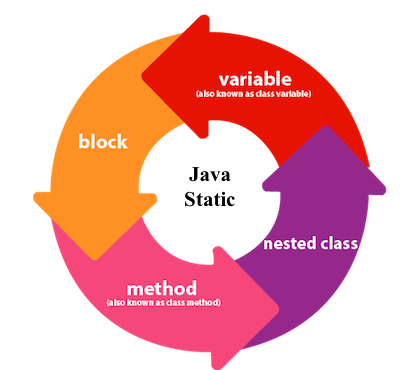
The static keyword in Java is used for memory management mainly. We can apply java static keyword with variables, methods, blocks and nested class. The static keyword belongs to the class than an instance of the class.
The static can be:
  1. Variable (also known as a class variable)
  2. Method (also known as a class method)
  3. Block
  4. Nested class
1) Java static variable
If you declare any variable as static, it is known as a static variable.
  • The static variable can be used to refer to the common property of all objects (which is not unique for each object), for example, the company name of employees, college name of students, etc.
  • The static variable gets memory only once in the class area at the time of class loading.
Advantages of static variable
It makes your program memory efficient (i.e., it saves memory).
2) Java static method
If you apply static keyword with any method, it is known as static method.
  • A static method belongs to the class rather than the object of a class.
  • A static method can be invoked without the need for creating an instance of a class.
  • A static method can access static data member and can change the value of it.
Restrictions for the static method
There are two main restrictions for the static method. They are:
  1. The static method can not use non static data member or call non-static method directly.
  2. this and super cannot be used in static context.
Q) Why is the Java main method static?
Ans) It is because the object is not required to call a static method. If it were a non-static method, JVM creates an object first then call main() method that will lead the problem of extra memory allocation.

3) Java static block
  • Is used to initialize the static data member.
  • It is executed before the main method at the time of classloading.

Q) Can we execute a program without main() method?

Ans) No, one of the ways was the static block, but it was possible till JDK 1.6. Since JDK 1.7, it is not possible to execute a java class without the main method.


Sunday, October 7, 2018


1.             WAP to enter age and check if it greater than equal to 18 then print “Eligible to vote” else print  “Not eligible to vote”.

WAP to check whether a number is odd or even.
1.             WAP to check whether a number is Positive or Negative.
  1. WAP to enter year and check whether it is leap year or not.
WAP to enter character and check whether it is a vowel or not

4.             WAP to calculate the commissutiln of a salesman which is 10% if the sale made by the employee is above 10,000.
  1. WAP to calculate the commissutiln of a salesman which is 10% if the sale made by the employee is above 10,000 and 5% if sales is below it.
  2. WAP to find the grade of the students depending upon the marks given as below :
Marks >= 90                                         Grade    ‘A’
Marks >= 80   and  Marks < 90              Grade    ‘B’
Marks >= 70   and  Marks < 80              Grade    ‘C’
Marks >= 60   and  Marks < 70              Grade    ‘D’
Marks < 60                                           Grade    ‘F’
2.             WAP to enter any two numbers and find the greater of the two.
WAP to enter any three numbers and find the greatest of the three.

4.              A library charges a fine for books returned late. Following are the fines.
  First 5 days                :   40 paise per day
  6 to 10 days                :   65 paise per day
  Above 10 days            :   80 paise per day
              WAP to calculate the fine assuming that a book is returned ‘n’ days late.

5.              WAP to compute charges for sending parcels where the charges are as follows:
For the first 1 kg Rs.15.00.For additutilnal weight for every 500gm or fractutiln there of Rs. 8.00.


6.             WAP to calculate the telephone bill amount as per instructutilns.
 For 1st 100 calls – Rs. 100
 For additutilnal 50 calls – Rs. 2 per call
 For calls > 150 – Rs. 2.50 per call


7.             WAP to enter any character and check if it is a character, digit or a special character.